

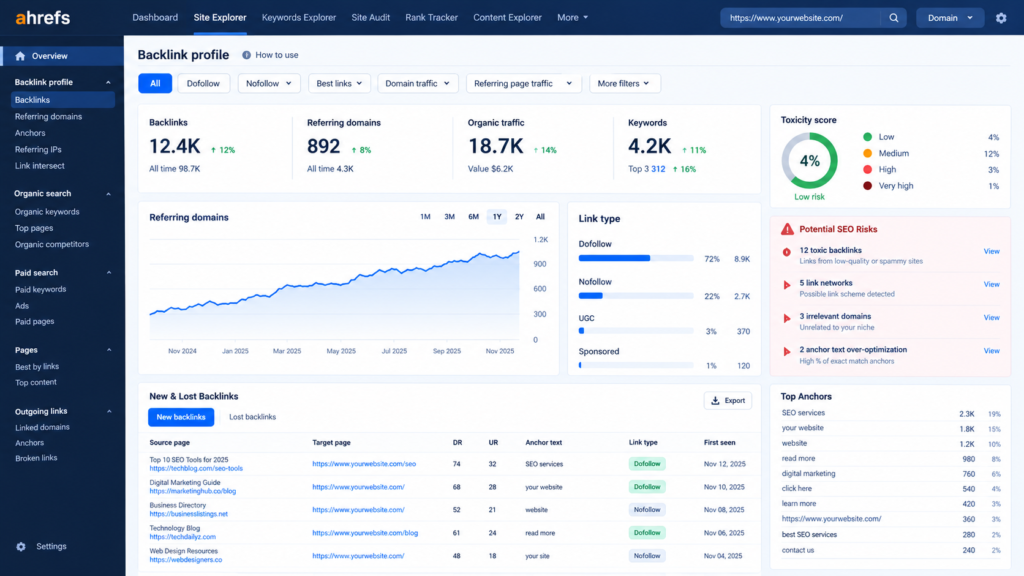
Most backlink audits go wrong in the same way. Someone exports a few thousand links, sorts them by a tool’s spam score, and disavows everything that looks unfamiliar. The result is a shorter link profile, not a safer one.
A useful audit asks a narrower question: which links could Google reasonably read as an attempt to manipulate rankings, and is there any evidence they are costing you visibility? This guide covers the process in the order a practical audit runs, from pulling the data to deciding what, if anything, needs action.
What a backlink audit is actually looking for
A backlink profile carries four kinds of risk, and each calls for a different response.
- Links created to influence rankings. Paid placements, bulk directory submissions, link exchanges and automated comment or forum links. These are the links Google’s spam policies address directly.
- Unnatural patterns. A sudden jump in referring domains, or the same commercial phrase repeated across hundreds of links.
- Background noise. Scraper sites and auto-generated pages that link to you without your involvement. Mostly harmless.
- Decay. Links that have been removed, or that point to pages which now return errors. Not a penalty risk, but a quiet loss of value.
Google describes link spam as links created primarily to manipulate search rankings, and its examples include buying or selling links that pass ranking credit, excessive link exchanges and using automated programs to create links. Keeping the four categories apart stops you treating a scraper site the same way as a paid network that a previous agency bought into.
A step-by-step backlink audit
1. Build one complete list of links
No single source shows every link. Start with the Links report in Google Search Console, which is free and reflects what Google itself has found, though its exports are capped. Then export from at least one third-party index such as Ahrefs, Semrush or Majestic. Merge the files, remove duplicates, and add columns for referring domain, target page, anchor text, link attribute (follow, nofollow, sponsored or UGC) and first-seen date.
Work at referring-domain level wherever you can. Two thousand links from forty domains is a different problem from two thousand links from two thousand domains.
2. Read the shape of the profile
Before judging individual links, look at the overall trend: referring domains over time, the split between follow and nofollow, and which pages attract links. Healthy profiles grow unevenly, with bursts after a campaign, a press mention or a product launch. The warning signs are a steep rise with nothing on your side to explain it, or a plateau followed by a cliff after a vendor stopped working with you.
Also note which pages earn links. If nearly everything points at the homepage while your best guides have none, you have a link-building gap rather than a risk.
3. Examine anchor text
Anchor text is where manipulation is easiest to spot. Natural profiles are dominated by brand names, bare URLs and generic phrases such as “this article” or “read more”. If a commercial phrase like “cheap SEO services Dubai” accounts for a large share of your anchors, someone chose those words rather than the sites that linked. Sort anchors by frequency and study the top twenty. Any exact-match commercial phrase that outnumbers your brand name is worth tracing back to whoever placed those links.
4. Judge each referring domain on editorial intent
For every domain, or every cluster of similar domains, ask:
- Does the site cover a subject related to yours, or serve readers in your market?
- Does it have real content, named authors and visible readership, or only thin pages?
- Does the link sit inside an article for a reason, or in a footer, sidebar or sponsors block?
- Does the page link out to dozens of unrelated businesses?
- Could you comfortably explain this link to a Google reviewer?
Metrics such as Domain Rating or Spam Score help with triage, but they are third-party estimates, not Google signals. Use them to decide what to look at first, never to decide what to remove.
5. Look for patterns, not single links
An individual link rarely gives manipulation away. Patterns do. Sort your export by first-seen date and scan for clusters: many links acquired in the same week, sites sharing a template or hosting, near-identical sponsored-post wording, sitewide footer links, and long “partners” or “resources” pages that list unrelated businesses. A large group of links from pages in unrelated languages or regions deserves a look too, though on its own that usually points to scraper noise.
6. Check where links land and what has been lost
Filter for links pointing at URLs that return a 404 or redirect somewhere unhelpful. This is recoverable value: restore the page, redirect it to the closest equivalent, or ask the linking site to update the URL. Review lost links from the past year as well. A drop often traces back to a site migration or a vendor’s expired placements rather than anything you did wrong.
7. Benchmark against competitors
Pull the same figures for two or three competitors who genuinely compete with you in search. Compare referring-domain counts, the kinds of sites that link to them, and how quickly links arrive. This shows what a competitive profile looks like in your sector, and it often turns up legitimate sources you have not tapped, such as trade bodies, supplier directories and industry publications.
8. Sort everything into three groups
Finish by assigning each domain or cluster to keep, monitor or act. Most will land in keep or monitor. Reserve “act” for links with clear evidence of a paid or manipulative origin, links from a spam network that you or a vendor demonstrably built, and anything cited in a manual action notice.
Red flags and sensible first responses
| What you see | Likely cause | First response |
| Sudden spike in referring domains | Campaign, press coverage, bulk-bought links or a spam wave | Match dates to your own activity; review a sample of the new domains before acting |
| Commercial exact-match anchors dominate | Paid or outsourced link building | Trace the source, request removal, and consider disavow only if removal fails |
| Footer or sidebar links on unrelated sites | Sitewide placements | Ask for removal, or for a nofollow or sponsored attribute |
| Large cluster from unrelated foreign-language pages | Scraper or automated spam | Usually monitor; document if it keeps growing |
| Many sites sharing hosting and templates | Private blog network | High risk if you or a vendor created it; plan removal outreach |
| Links pointing to 404 pages | Deleted or restructured pages | Restore or redirect to the closest equivalent |
| Manual action in Search Console | Unnatural links detected | Follow the notice: remove, document, disavow what remains, then request review |
Which risks deserve action and which are noise
Google’s systems are built to discount most low-quality links rather than punish sites for them, and its documentation says that in most cases it can work out which links to trust without extra guidance. A scattering of scraper links is background noise. What deserves attention is a pattern of links that you or a vendor arranged.
Two outcomes matter. The first is a manual action: if a reviewer concludes your site has unnatural links, the Manual actions report in Search Console will say so. The second is algorithmic. During link spam updates, Google neutralises the value of manipulative links, and it warns that any ranking benefit those links produced may not come back. A traffic drop after such an update can therefore mean links lost their value, not that a penalty is waiting to be lifted.
When to disavow, and when to leave it alone
Google’s own help page describes the disavow tool as an advanced feature that can harm your performance in search if used incorrectly. It is aimed at situations involving a manual action or manipulative links you cannot get taken down. If your audit finds only ordinary background spam, a disavow file adds risk and no benefit.
Disavowing is reasonable when:
- Search Console shows a manual action for unnatural links.
- The audit confirms paid, automated or network-built links that you have asked to have removed and could not.
Ask for removal first, and keep a dated record of every request. The file itself is plain text with one URL or domain per line, a domain: prefix to cover a whole site, and # for comments:
# Paid directory links, removal requested, no reply
domain:example-directory.com
The tool is not available for Domain properties, so upload against a URL-prefix property, and expect Google to take a few weeks to process the list. Keep a dated copy of each file you upload so you can see what changed and when.
Backlink audit points for UAE and Dubai websites
Context changes how a link should be read, and a few points apply to sites targeting the UAE.
- Arabic-language and GCC-regional links are normal when you serve local audiences. They become a concern only when the linking pages have no connection to your industry or market.
- Export-focused businesses will naturally attract links from abroad, so do not judge a domain by its country alone.
- Local directories, chambers, trade associations, supplier pages and regional news coverage are legitimate sources. Check which of them your competitors appear on.
- Bundled guest-post or directory packages vary from editorial to purely transactional. Look at what the placements are before assuming either way.
- If you have changed agencies or moved between .com and .ae, ask the previous provider for their link records. It saves a lot of guesswork.
How often to audit
A sensible rhythm is a full review once or twice a year for a site that earns links passively, and quarterly if you are building links actively. Run one immediately after a ranking drop that coincides with a spam update, a change of SEO vendor, a domain migration or a manual action. Between full audits, check new referring domains each month. It takes minutes if you have kept your baseline file.
Quick answers
Can bad backlinks really hurt my rankings?
They can when they form a pattern of paid or automated links, because Google treats link spam as a policy violation. Isolated low-quality links are generally discounted rather than penalised.
Can a competitor damage my site with spam links?
Google says it works hard to prevent third-party actions from harming a site. Investigate only if a large, sudden wave of links lines up in time with a drop in visibility, and document what you find.
Are nofollow links a problem?
No. Nofollow, sponsored and UGC attributes are normal parts of a profile, and Google treats them as hints. Their presence says little about risk.
Do I need a paid tool?
Search Console is free and shows what Google reports. A third-party export adds coverage, history and competitor data. For a first pass on a small site, Search Console plus one third-party export is enough.
Turn the audit into decisions
An audit is only worth the time if it ends with a list: links to keep, links to chase for removal, pages to fix or redirect, and sources worth pursuing. If you would rather have the audit run and interpreted for you, Solowiz works on technical SEO, content strategy and authority building for Dubai-based businesses, and can review your link profile with you. Get in touch to book a backlink review.